👤 My Account
Reset My Password
Learn how to reset your password by requesting a new one to regain access to your account.
🔐 How to Reset Your Password
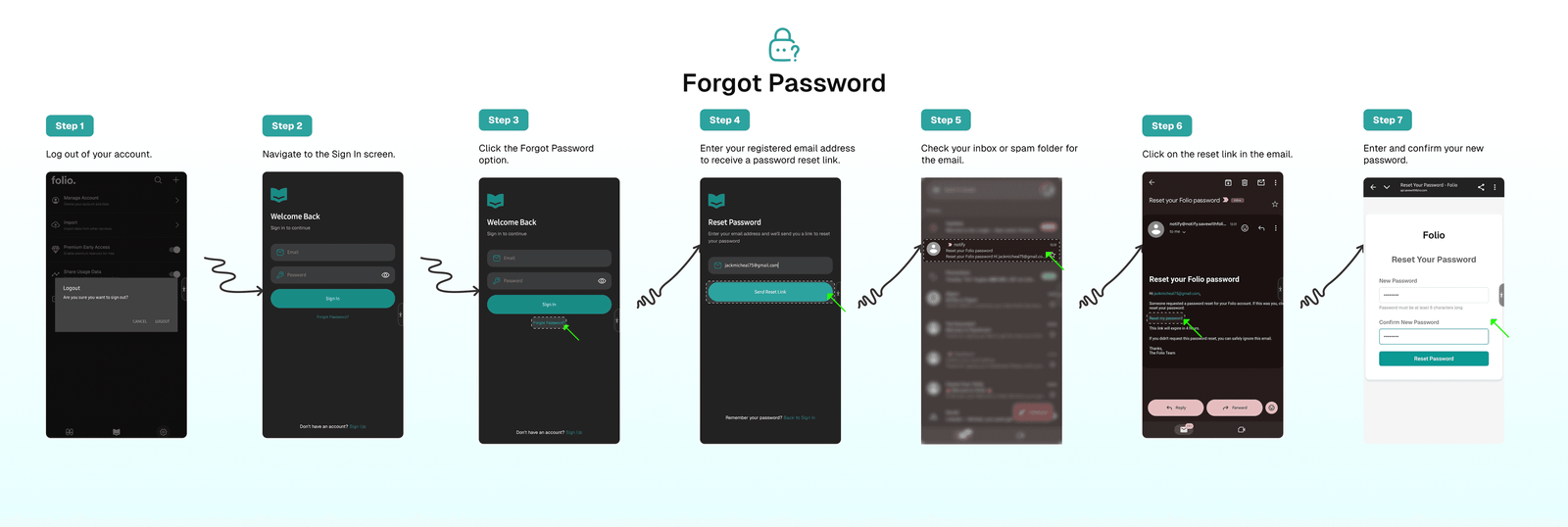
To reset your password:
- Log out of your account.
- Click the
Sign Inoption. - Select
Forgot Password. - Enter your registered email address to receive a password reset link.
- Check your inbox or spam folder for the email.
- Click on the reset link in the email.
- Enter and confirm your new password.
Tip
If you do not receive the password reset email within a few minutes, please check your spam or junk folder. If you still cannot find it, ensure that you entered the correct email address associated with your account.
⁉️ FAQs
Last updated on